
Documentation Index

Fetch the complete documentation index at: https://docs.supertoneapi.com/llms.txt

Use this file to discover all available pages before exploring further.

A voice is the character that speaks your text. Every TTS request identifies the speaker with a voice_id. Supertone provides two kinds of voices, in separate endpoints:
  • Preset voices — designed and provided by Supertone. Browse them in the Play voice library or via GET /v1/voices. This page covers preset voices.
  • Custom voices — voice clones you create and manage yourself. See Custom voices.

Find a voice ID

Copy from Supertone Play (fastest)

Open the voice library in Supertone Play, hover any voice card, and click Copy voice ID. The ID is copied to your clipboard, ready to paste into a request.
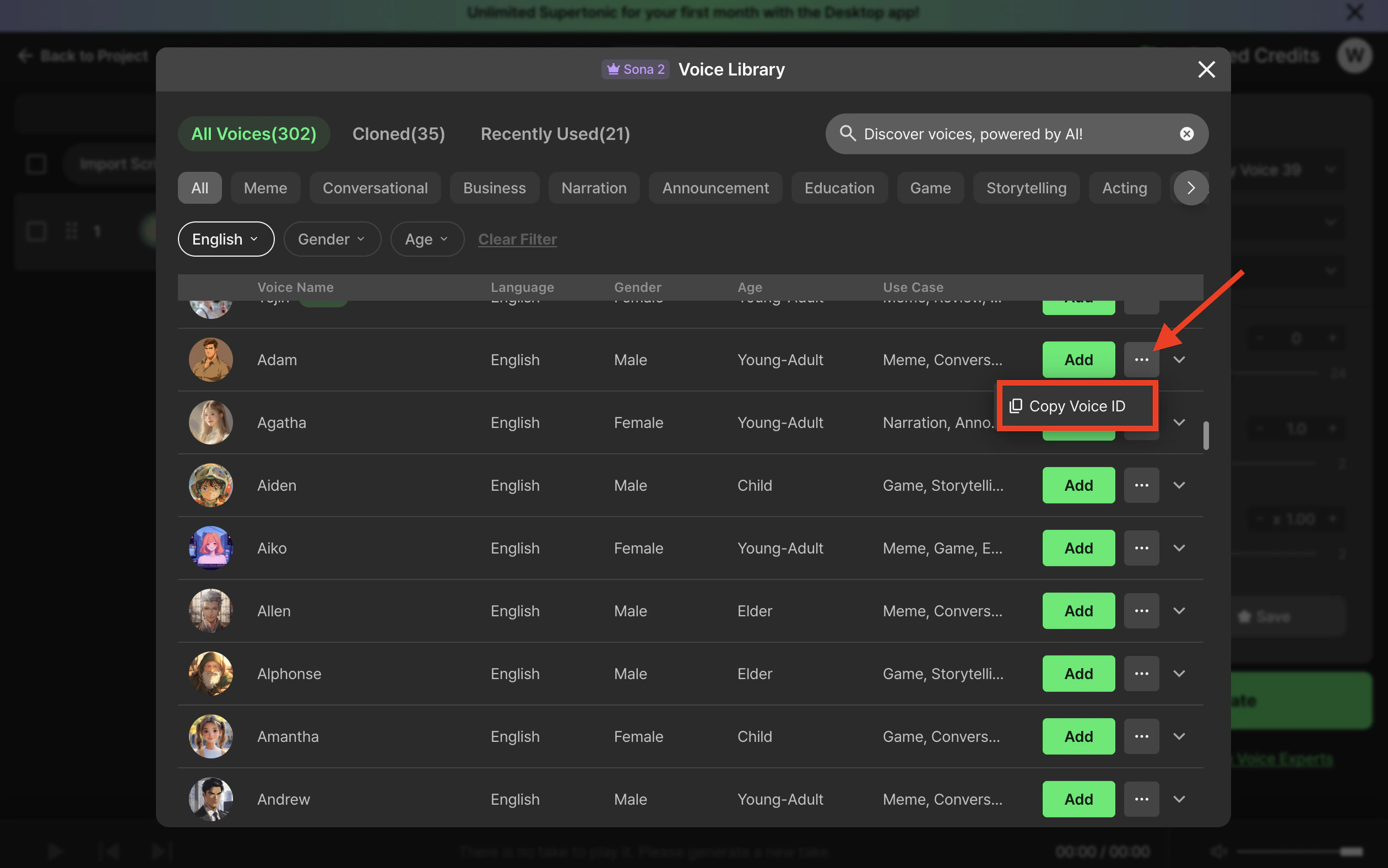
Copy a voice ID from Supertone Play

List voices via the API

import os
from supertone import Supertone

with Supertone(api_key=os.environ["SUPERTONE_API_KEY"]) as client:
    result = client.voices.list_voices(page_size=20)
    for voice in result.items or []:
        print(voice.voice_id, voice.name, voice.language)

Search by filters

Use search_voices to filter by language, style, gender, age, use case, or model. Multiple values are comma-separated and treated as OR conditions.
result = client.voices.search_voices(
    language="ko,en",
    style="happy",
    page_size=20,
)
See the API reference for the full parameter list: Search voices.

The voice object

Every voice returned by the API has roughly this shape:
{
  "voice_id": "20160a4c5ba38967330c84",
  "name": "Adam",
  "description": "",
  "age": "young-adult",
  "gender": "male",
  "use_case": "meme",
  "language": ["ko", "en", "ja"],
  "styles": ["neutral"],
  "models": ["sona_speech_1"],
  "samples": [
    {
      "language": "en",
      "style": "neutral",
      "model": "sona_speech_1",
      "url": "https://.../sample.wav"
    }
  ],
  "thumbnail_image_url": "https://.../thumb.png"
}
FieldMeaning
voice_idThe identifier to pass to TTS requests.
languageLanguages this voice supports. Your request language must be in this list.
stylesEmotional styles available. The first entry is the default.
modelsModels the voice can be used with.
samplesPre-rendered preview clips per (language, style, model) combination — great for in-app previews.

Important constraints

  • All three must align. A successful TTS call needs a voice_id plus a (language, style, model) combination that the voice actually supports. If the combination doesn’t exist, the API returns an error.
  • Default style. If you omit style, the first value in the voice’s styles array is used. Different characters can have different defaults, so check the voice object before omitting.
  • Permissions. Preset voices are available to every account; access is gated only by your plan.

Next

Choose a model

Match voices to the right TTS model.

Custom voices

Clone and manage your own voices.