> ## Documentation Index
> Fetch the complete documentation index at: https://docs.supertoneapi.com/llms.txt
> Use this file to discover all available pages before exploring further.
# 보이스
> 보이스 ID 개념을 이해하고, 프리셋 보이스 라이브러리를 둘러보며, 언어·스타일·기타 필터로 검색하세요.
이 문서는 영어 원문을 기반으로 자동 번역되었습니다. 표현이 어색하거나 모호한 부분이 있을 수 있으니, 정확한 내용은 [영어 원문](/en/docs/core-concepts/voices)을 함께 확인해 주세요.
**보이스(voice)** 는 텍스트를 발화하는 캐릭터입니다. 모든 TTS 요청은 `voice_id`로 화자를 지정합니다. Supertone은 두 종류의 보이스를 별도의 엔드포인트로 제공합니다.
* **프리셋 보이스** — Supertone이 설계하고 제공하는 보이스입니다. [Play 보이스 라이브러리](https://play.supertone.ai) 또는 `GET /v1/voices`로 둘러볼 수 있습니다. **이 페이지는 프리셋 보이스를 다룹니다.**
* **커스텀 보이스** — 직접 생성하고 관리하는 보이스 클론입니다. [커스텀 보이스](/ko/docs/core-concepts/custom-voices)를 참고하세요.
## 보이스 ID 찾기
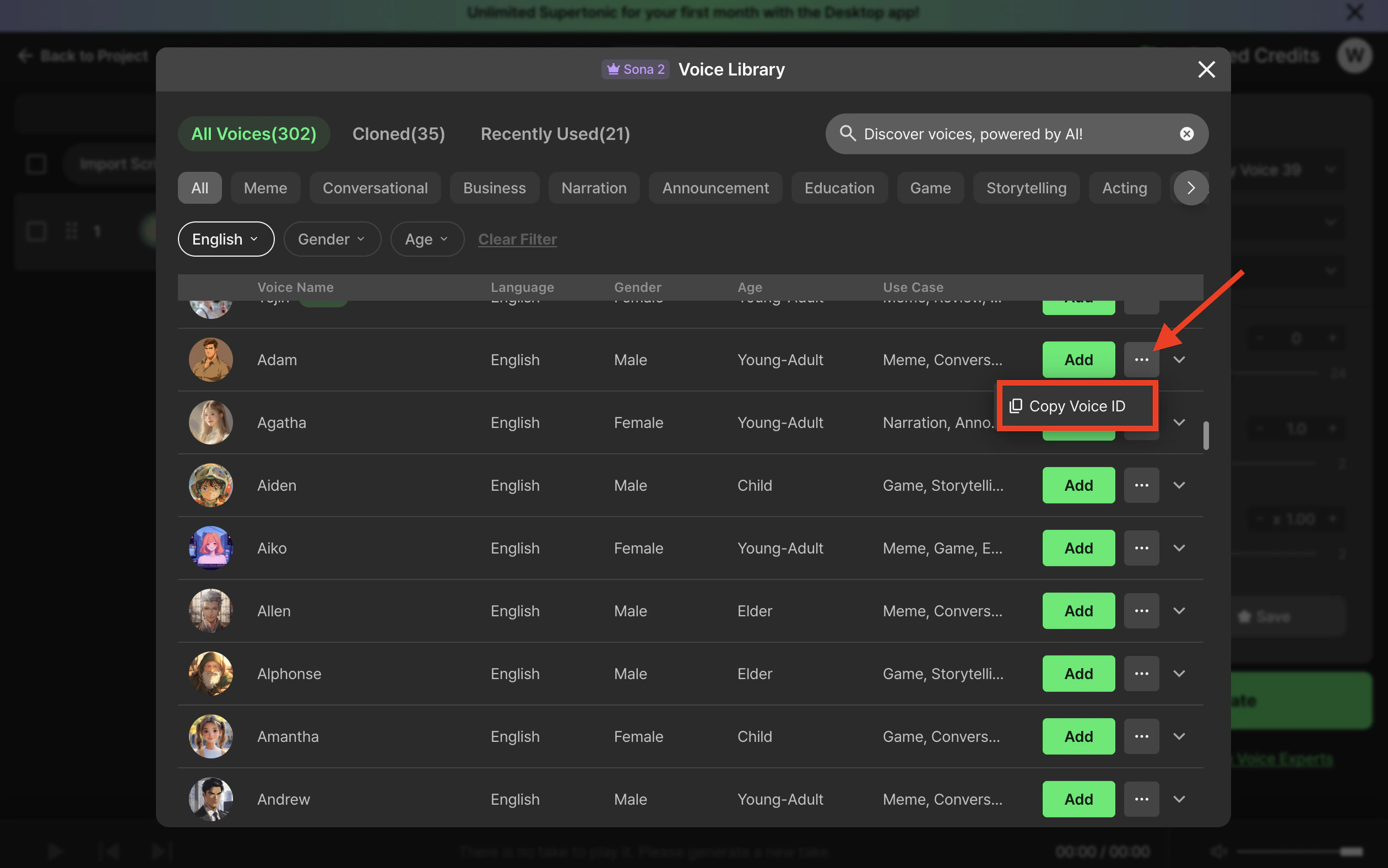
### Supertone Play에서 복사하기(가장 빠름)
[Supertone Play](https://play.supertone.ai)에서 보이스 라이브러리를 열고, 원하는 보이스 카드 위에 마우스를 올린 뒤 **Copy voice ID**를 클릭하세요. ID가 클립보드에 복사되어 바로 요청에 붙여넣을 수 있습니다.
 ### API로 보이스 조회하기
```python theme={"dark"}
import os
from supertone import Supertone
with Supertone(api_key=os.environ["SUPERTONE_API_KEY"]) as client:
result = client.voices.list_voices(page_size=20)
for voice in result.items or []:
print(voice.voice_id, voice.name, voice.language)
```
```typescript theme={"dark"}
import { Supertone } from "@supertone/supertone";
const client = new Supertone({ apiKey: process.env.SUPERTONE_API_KEY });
const result = await client.voices.listVoices({ pageSize: 20 });
for (const voice of result.items ?? []) {
console.log(voice.voiceId, voice.name, voice.language);
}
```
```bash theme={"dark"}
curl "https://supertoneapi.com/v1/voices?page_size=20" \
-H "x-sup-api-key: $SUPERTONE_API_KEY"
```
### 필터로 검색하기
`search_voices`로 언어, 스타일, 성별, 연령, 용도, 모델에 따라 필터링할 수 있습니다. 여러 값은 쉼표로 구분하며 OR 조건으로 처리됩니다.
```python theme={"dark"}
result = client.voices.search_voices(
language="ko,en",
style="happy",
page_size=20,
)
```
```typescript theme={"dark"}
const result = await client.voices.searchVoices({
language: "ko,en",
style: "happy",
pageSize: 20,
});
```
```bash theme={"dark"}
curl "https://supertoneapi.com/v1/voices/search?language=ko,en&style=happy&page_size=20" \
-H "x-sup-api-key: $SUPERTONE_API_KEY"
```
전체 파라미터 목록은 API 레퍼런스를 참고하세요. [Search voices](/ko/api-reference/endpoints/search-voices).
## 보이스 객체
API가 반환하는 모든 보이스는 대략 다음과 같은 형태입니다.
```json theme={"dark"}
{
"voice_id": "20160a4c5ba38967330c84",
"name": "Adam",
"description": "",
"age": "young-adult",
"gender": "male",
"use_case": "meme",
"language": ["ko", "en", "ja"],
"styles": ["neutral"],
"models": ["sona_speech_1"],
"samples": [
{
"language": "en",
"style": "neutral",
"model": "sona_speech_1",
"url": "https://.../sample.wav"
}
],
"thumbnail_image_url": "https://.../thumb.png"
}
```
| Field | Meaning |
| ---------- | --------------------------------------------------------------------- |
| `voice_id` | TTS 요청에 전달할 식별자입니다. |
| `language` | 이 보이스가 지원하는 언어입니다. 요청의 `language`는 이 목록에 포함되어야 합니다. |
| `styles` | 사용할 수 있는 감정 스타일입니다. **첫 번째 항목이 기본값입니다.** |
| `models` | 이 보이스를 함께 사용할 수 있는 모델입니다. |
| `samples` | `(language, style, model)` 조합별로 미리 렌더링된 미리듣기 클립입니다 — 앱 내 미리듣기에 유용합니다. |
## 중요 제약사항
* **세 가지 모두가 맞아야 합니다.** TTS 호출이 성공하려면 `voice_id`와 함께 해당 보이스가 실제로 지원하는 `(language, style, model)` 조합이 필요합니다. 조합이 존재하지 않으면 API는 오류를 반환합니다.
* **기본 스타일.** `style`을 생략하면 보이스의 `styles` 배열의 첫 번째 값이 사용됩니다. 캐릭터마다 기본값이 다를 수 있으니 생략 전에 보이스 객체를 확인하세요.
* **권한.** 프리셋 보이스는 모든 계정에서 사용할 수 있으며, 접근은 요금제에 의해서만 제한됩니다.
## 다음
보이스에 맞는 TTS 모델을 매칭하세요.
자신만의 보이스를 클로닝하고 관리하세요.
### API로 보이스 조회하기
```python theme={"dark"}
import os
from supertone import Supertone
with Supertone(api_key=os.environ["SUPERTONE_API_KEY"]) as client:
result = client.voices.list_voices(page_size=20)
for voice in result.items or []:
print(voice.voice_id, voice.name, voice.language)
```
```typescript theme={"dark"}
import { Supertone } from "@supertone/supertone";
const client = new Supertone({ apiKey: process.env.SUPERTONE_API_KEY });
const result = await client.voices.listVoices({ pageSize: 20 });
for (const voice of result.items ?? []) {
console.log(voice.voiceId, voice.name, voice.language);
}
```
```bash theme={"dark"}
curl "https://supertoneapi.com/v1/voices?page_size=20" \
-H "x-sup-api-key: $SUPERTONE_API_KEY"
```
### 필터로 검색하기
`search_voices`로 언어, 스타일, 성별, 연령, 용도, 모델에 따라 필터링할 수 있습니다. 여러 값은 쉼표로 구분하며 OR 조건으로 처리됩니다.
```python theme={"dark"}
result = client.voices.search_voices(
language="ko,en",
style="happy",
page_size=20,
)
```
```typescript theme={"dark"}
const result = await client.voices.searchVoices({
language: "ko,en",
style: "happy",
pageSize: 20,
});
```
```bash theme={"dark"}
curl "https://supertoneapi.com/v1/voices/search?language=ko,en&style=happy&page_size=20" \
-H "x-sup-api-key: $SUPERTONE_API_KEY"
```
전체 파라미터 목록은 API 레퍼런스를 참고하세요. [Search voices](/ko/api-reference/endpoints/search-voices).
## 보이스 객체
API가 반환하는 모든 보이스는 대략 다음과 같은 형태입니다.
```json theme={"dark"}
{
"voice_id": "20160a4c5ba38967330c84",
"name": "Adam",
"description": "",
"age": "young-adult",
"gender": "male",
"use_case": "meme",
"language": ["ko", "en", "ja"],
"styles": ["neutral"],
"models": ["sona_speech_1"],
"samples": [
{
"language": "en",
"style": "neutral",
"model": "sona_speech_1",
"url": "https://.../sample.wav"
}
],
"thumbnail_image_url": "https://.../thumb.png"
}
```
| Field | Meaning |
| ---------- | --------------------------------------------------------------------- |
| `voice_id` | TTS 요청에 전달할 식별자입니다. |
| `language` | 이 보이스가 지원하는 언어입니다. 요청의 `language`는 이 목록에 포함되어야 합니다. |
| `styles` | 사용할 수 있는 감정 스타일입니다. **첫 번째 항목이 기본값입니다.** |
| `models` | 이 보이스를 함께 사용할 수 있는 모델입니다. |
| `samples` | `(language, style, model)` 조합별로 미리 렌더링된 미리듣기 클립입니다 — 앱 내 미리듣기에 유용합니다. |
## 중요 제약사항
* **세 가지 모두가 맞아야 합니다.** TTS 호출이 성공하려면 `voice_id`와 함께 해당 보이스가 실제로 지원하는 `(language, style, model)` 조합이 필요합니다. 조합이 존재하지 않으면 API는 오류를 반환합니다.
* **기본 스타일.** `style`을 생략하면 보이스의 `styles` 배열의 첫 번째 값이 사용됩니다. 캐릭터마다 기본값이 다를 수 있으니 생략 전에 보이스 객체를 확인하세요.
* **권한.** 프리셋 보이스는 모든 계정에서 사용할 수 있으며, 접근은 요금제에 의해서만 제한됩니다.
## 다음
보이스에 맞는 TTS 모델을 매칭하세요.
자신만의 보이스를 클로닝하고 관리하세요.