> ## Documentation Index
> Fetch the complete documentation index at: https://docs.supertoneapi.com/llms.txt
> Use this file to discover all available pages before exploring further.
# Voices
> Understand voice IDs, browse the preset voice library, and search by language, style, or other filters.
A **voice** is the character that speaks your text. Every TTS request identifies the speaker with a `voice_id`. Supertone provides two kinds of voices, in separate endpoints:
* **Preset voices** — designed and provided by Supertone. Browse them in the [Play voice library](https://play.supertone.ai) or via `GET /v1/voices`. **This page covers preset voices.**
* **Custom voices** — voice clones you create and manage yourself. See [Custom voices](/en/docs/core-concepts/custom-voices).
## Find a voice ID
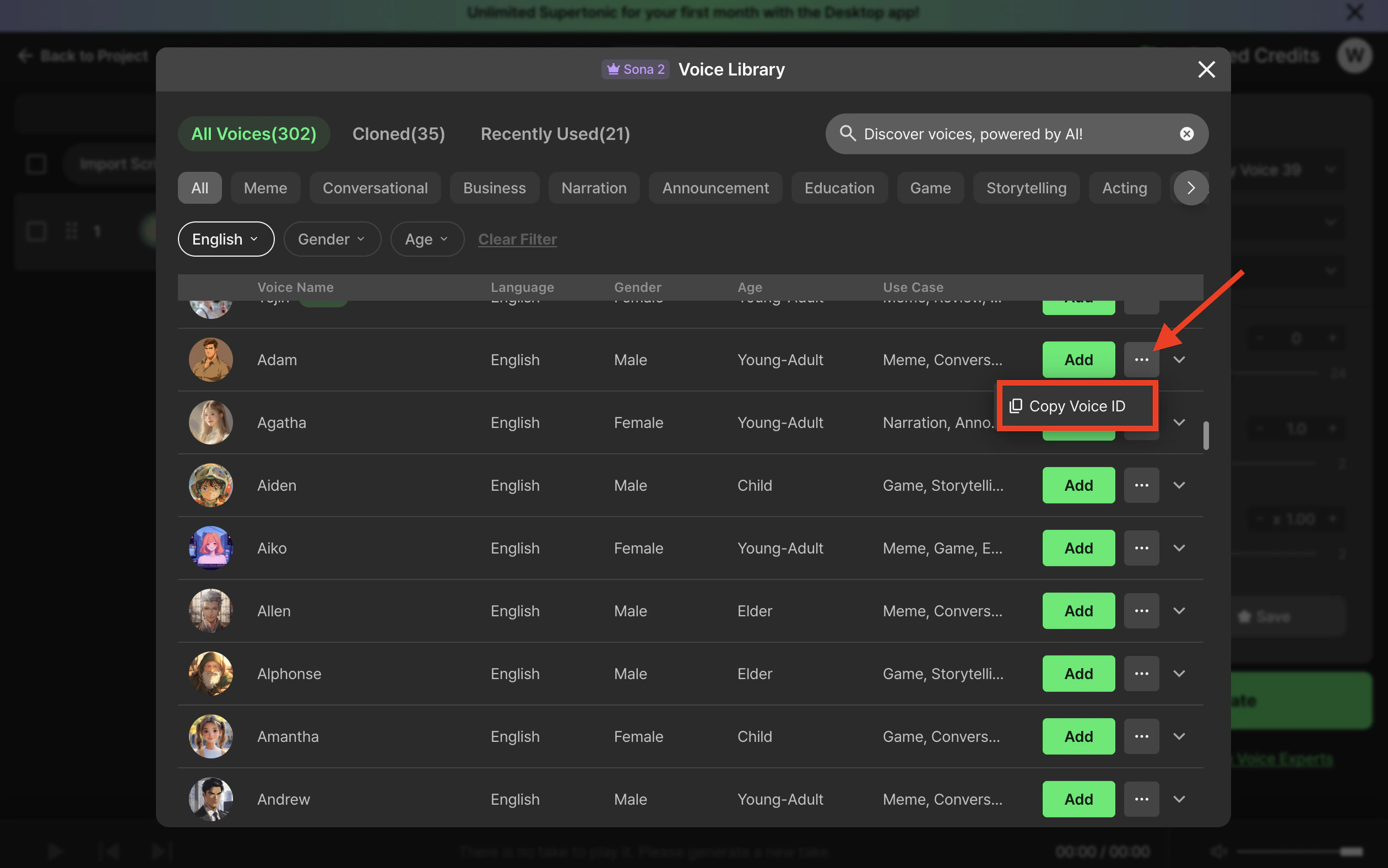
### Copy from Supertone Play (fastest)
Open the voice library in [Supertone Play](https://play.supertone.ai), hover any voice card, and click **Copy voice ID**. The ID is copied to your clipboard, ready to paste into a request.
 ### List voices via the API
```python theme={"dark"}
import os
from supertone import Supertone
with Supertone(api_key=os.environ["SUPERTONE_API_KEY"]) as client:
result = client.voices.list_voices(page_size=20)
for voice in result.items or []:
print(voice.voice_id, voice.name, voice.language)
```
```typescript theme={"dark"}
import { Supertone } from "@supertone/supertone";
const client = new Supertone({ apiKey: process.env.SUPERTONE_API_KEY });
const result = await client.voices.listVoices({ pageSize: 20 });
for (const voice of result.items ?? []) {
console.log(voice.voiceId, voice.name, voice.language);
}
```
```bash theme={"dark"}
curl "https://supertoneapi.com/v1/voices?page_size=20" \
-H "x-sup-api-key: $SUPERTONE_API_KEY"
```
### Search by filters
Use `search_voices` to filter by language, style, gender, age, use case, or model. Multiple values are comma-separated and treated as OR conditions.
```python theme={"dark"}
result = client.voices.search_voices(
language="ko,en",
style="happy",
page_size=20,
)
```
```typescript theme={"dark"}
const result = await client.voices.searchVoices({
language: "ko,en",
style: "happy",
pageSize: 20,
});
```
```bash theme={"dark"}
curl "https://supertoneapi.com/v1/voices/search?language=ko,en&style=happy&page_size=20" \
-H "x-sup-api-key: $SUPERTONE_API_KEY"
```
See the API reference for the full parameter list: [Search voices](/en/api-reference/endpoints/search-voices).
## The voice object
Every voice returned by the API has roughly this shape:
```json theme={"dark"}
{
"voice_id": "20160a4c5ba38967330c84",
"name": "Adam",
"description": "",
"age": "young-adult",
"gender": "male",
"use_case": "meme",
"language": ["ko", "en", "ja"],
"styles": ["neutral"],
"models": ["sona_speech_1"],
"samples": [
{
"language": "en",
"style": "neutral",
"model": "sona_speech_1",
"url": "https://.../sample.wav"
}
],
"thumbnail_image_url": "https://.../thumb.png"
}
```
| Field | Meaning |
| ---------- | -------------------------------------------------------------------------------------------------- |
| `voice_id` | The identifier to pass to TTS requests. |
| `language` | Languages this voice supports. Your request `language` must be in this list. |
| `styles` | Emotional styles available. **The first entry is the default.** |
| `models` | Models the voice can be used with. |
| `samples` | Pre-rendered preview clips per `(language, style, model)` combination — great for in-app previews. |
## Important constraints
* **All three must align.** A successful TTS call needs a `voice_id` plus a `(language, style, model)` combination that the voice actually supports. If the combination doesn't exist, the API returns an error.
* **Default style.** If you omit `style`, the first value in the voice's `styles` array is used. Different characters can have different defaults, so check the voice object before omitting.
* **Permissions.** Preset voices are available to every account; access is gated only by your plan.
## Next
Match voices to the right TTS model.
Clone and manage your own voices.
### List voices via the API
```python theme={"dark"}
import os
from supertone import Supertone
with Supertone(api_key=os.environ["SUPERTONE_API_KEY"]) as client:
result = client.voices.list_voices(page_size=20)
for voice in result.items or []:
print(voice.voice_id, voice.name, voice.language)
```
```typescript theme={"dark"}
import { Supertone } from "@supertone/supertone";
const client = new Supertone({ apiKey: process.env.SUPERTONE_API_KEY });
const result = await client.voices.listVoices({ pageSize: 20 });
for (const voice of result.items ?? []) {
console.log(voice.voiceId, voice.name, voice.language);
}
```
```bash theme={"dark"}
curl "https://supertoneapi.com/v1/voices?page_size=20" \
-H "x-sup-api-key: $SUPERTONE_API_KEY"
```
### Search by filters
Use `search_voices` to filter by language, style, gender, age, use case, or model. Multiple values are comma-separated and treated as OR conditions.
```python theme={"dark"}
result = client.voices.search_voices(
language="ko,en",
style="happy",
page_size=20,
)
```
```typescript theme={"dark"}
const result = await client.voices.searchVoices({
language: "ko,en",
style: "happy",
pageSize: 20,
});
```
```bash theme={"dark"}
curl "https://supertoneapi.com/v1/voices/search?language=ko,en&style=happy&page_size=20" \
-H "x-sup-api-key: $SUPERTONE_API_KEY"
```
See the API reference for the full parameter list: [Search voices](/en/api-reference/endpoints/search-voices).
## The voice object
Every voice returned by the API has roughly this shape:
```json theme={"dark"}
{
"voice_id": "20160a4c5ba38967330c84",
"name": "Adam",
"description": "",
"age": "young-adult",
"gender": "male",
"use_case": "meme",
"language": ["ko", "en", "ja"],
"styles": ["neutral"],
"models": ["sona_speech_1"],
"samples": [
{
"language": "en",
"style": "neutral",
"model": "sona_speech_1",
"url": "https://.../sample.wav"
}
],
"thumbnail_image_url": "https://.../thumb.png"
}
```
| Field | Meaning |
| ---------- | -------------------------------------------------------------------------------------------------- |
| `voice_id` | The identifier to pass to TTS requests. |
| `language` | Languages this voice supports. Your request `language` must be in this list. |
| `styles` | Emotional styles available. **The first entry is the default.** |
| `models` | Models the voice can be used with. |
| `samples` | Pre-rendered preview clips per `(language, style, model)` combination — great for in-app previews. |
## Important constraints
* **All three must align.** A successful TTS call needs a `voice_id` plus a `(language, style, model)` combination that the voice actually supports. If the combination doesn't exist, the API returns an error.
* **Default style.** If you omit `style`, the first value in the voice's `styles` array is used. Different characters can have different defaults, so check the voice object before omitting.
* **Permissions.** Preset voices are available to every account; access is gated only by your plan.
## Next
Match voices to the right TTS model.
Clone and manage your own voices.